
Archived publication · 2021 edition
This is a historical publication, not updated security guidance. Original claims and contact details reflect its source edition. Product terminology has been updated; the original PDF is retained. Contact Sandbox Technologies for current advice.
Backups Frequency and Retention Strategy — Historical Edition
Contents · original publication
Backups, Frequency and Retention Strategy
Understanding the basics: A layperson’s guide and checklist for overseeing IT.
Best Practice Checklist Series
An exclusive publication of Sandbox Technologies, Inc.
3868 W Carson St, Suite 316, Torrance, CA 90503 Tel. (424) 207-5130 http://www.sandboxtech.com
Original PDF · page 2
Backups, Frequency and Retention Strategy
It is a common misconception that backups are a panacea for any technical crisis. Unfortunately, that’s not the case.
Backups differ significantly from one to the next. When the need to restore data arises, having the strategy that’s right for your organization can mean the difference between success and failure. While many companies leave details like methodology, cloud redundancy, backup frequency, consolidation, and retention to the discretion of their IT personnel, decisions with business ramifications should not be made by technical personnel, but rather with them.
This document provides a brief primer for the terminology required to understand common backup solutions. Hypothetical scenarios illustrate how simple configuration choices determine an organization’s ability to recover from common problems.
At a time when threats to information security and data integrity are greater than ever, the importance of understanding your company’s backup protections cannot be overstated. As always, should you wish to discuss your current backup or configuration settings, your Sandbox Technologies Consulting CIO will be happy to answer any questions you may have.
- – 2 –
Original PDF · page 3
Table of Contents
Backup Terminology ……………………………………………………………………………………………………….. 4
Scenarios ……………………………………………………………………………………………………………………… 5
General Specifications …………………………………………………………………………………………………….. 7
Sample Backup Schedule ………………………………………………………………………………………………… 9
Recommended Implementation Practices …………………………………………………………………………. 10
- – 3 –
Original PDF · page 4
Backup Terminology
Snapshot Frequency
Snapshot frequency is the interval at which a backup solution has been configured to capture changes that have been made to a computer subsequent to the last successful snapshot. Understanding your snapshot frequency is important, because changes that are made and promptly reversed between snapshot occurrences will not be captured by conventional backup solutions.
Consolidation
Consolidation is the process during which a backup solution incorporates smaller, more granular backups into larger ones. For example, snapshots may be consolidated into daily backups, daily backups into weekly backups, and weekly backups into monthly backups.
What’s important to understand about the consolidation process is that when consolidation occurs, the resulting backup file only reflects the status of the target computer at the date and time of the last snapshot taken in the series of snapshots being consolidated. This means that while numerous snapshots could be taken over the course of several days, changes that were made and subsequently reversed or deleted prior to creation of the last snapshot in the consolidation are discarded.
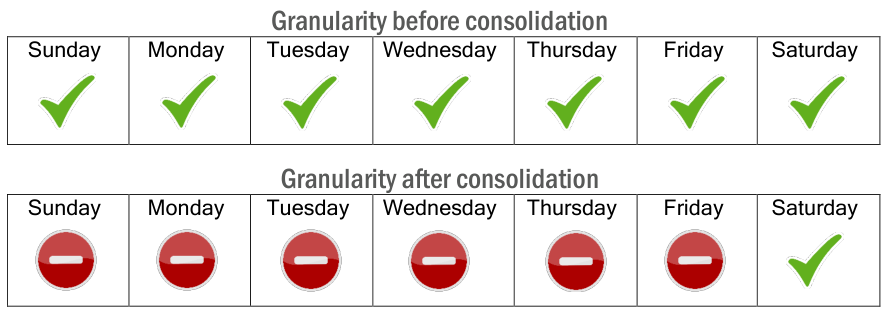
To further illustrate this concept, if snapshots spanning a one-week period were to be consolidated on a Saturday, once the consolidation occurred, the ability to restore the backed-up system to the exact state at which it existed on any other day that week would be lost. The following example illustrates available restore points before and after a hypothetical consolidation.
Granularity before consolidation
Sunday Monday Tuesday Wednesday Thursday Friday Saturday
Granularity after consolidation
Sunday Monday Tuesday Wednesday Thursday Friday Saturday
Consolidation Schedule
Consolidation Schedule refers to the frequency at which consolidations occur. Frequent consolidation is important because it is what prevents the accumulation of excessive backup data and the rapid depletion of storage.
Retention Time
Retention time refers to the length of time backups are retained before they are deleted.
- – 4 –
Original PDF · page 5
Scenarios
The following scenarios illustrate how backup configuration choices can impact the ability to recover data in certain situations. This is normal, as few backup strategies provide the ability to recover from every possible scenario. Other than compliance-based retention and journaling solutions, most business backup configurations trade granularity for cost savings. Given the high cost of storage, the choice is understandable.
A successful backup strategy is one that achieves an optimal balance between data availability and cost, without compromising essential requirements. For many, the likelihood of the following scenarios occurring is minimal enough that the exposure constitutes an acceptable risk.
In providing this information, we make no judgment regarding what caveats are or are not acceptable. Our objective is to educate and inform those responsible for risk management, ensuring an opportunity for informed decisions to be made.
Data Corruption
An organization dutifully checks its daily backup notifications to confirm success. Unbeknownst to anyone however, a disk in the server array has begun to become corrupted. Because the corrupted volume is rarely accessed and the corrupted drive remains functional, it generates no alerts. The corruption goes unnoticed for an extended period. When the problem is discovered, the IT Administrator attempts to recover the data from the most recent successful backup.
The retention time elected is one year and the corruption began to manifest at some point prior. IT is unable to recover corrupted documents that are needed for an audit.
Employee Fraud Investigation
A financial services firm suspects that a longtime employee has been embezzling money. After considerable investigation, it is believed that the employee was creating fraudulent transfer requests every Tuesday. The company’s workflow is such that the requests are saved to a shared folder the company’s Controller queries every Wednesday before making the transfers. Evidence indicates that every Thursday the employee was replacing the completed transfer authorizations with identical documents bearing the name and account information of a legitimate vendor. It is believed that the illicit activity spans a period of several years.
The company wishes to prosecute the employee and attempt to recover the exfiltrated funds. Unfortunately, the employee has taken measures to hide the true owner of the account into which funds were being transferred. Investigators request copies of the fraudulent transfer requests, confident that the metadata will prove they were created by the employee under suspicion.
Unfortunately, the company’s backups are consolidated on a weekly basis every Saturday, and then again on the last day of each month. As a result, the activity occurring between Tuesday and Thursday each week is no longer available for recovery.
- – 5 –
Original PDF · page 6
Lawsuit or Legal Threat
A company is served with a lawsuit alleging third party harassment and discrimination by one of its trusted employees. The complaint alleges that the employee engaged in inappropriate verbal conduct with a vendor and sent a series of suggestive emails. Skeptical of the claim, the company’s employment counsel interviews the accused who denies the accusations. There were no witnesses to the alleged verbal conversations, and the company’s counsel hopes that a review of the employee’s emails will confirm or disconfirm the allegations of written misconduct.
The accused employee is a member of the organization’s IT staff and aware of the company’s snapshot frequency. Unbeknownst to the company’s management, harassing emails were being sent but immediately deleted from the employee’s sent items and deleted items folders between snapshot intervals. Trusting the veracity of the employee’s statements and finding no evidence of impropriety, the company spends considerable time and financial resources preparing to defend the claim before receiving evidence of their employee’s guilt during the discovery process. Had this evidence been available sooner, the employer could have likely settled the claim for a smaller sum, however tensions have long since heightened, and the opportunity has passed.
Disgruntled Employee / Accidental Deletion
Accidental deletion of files is a common occurrence. All too often, an employee will accidentally delete the wrong file without realizing it until much later. It’s also not uncommon for disgruntled employees to maliciously purge or alter crucial files before departing an organization.
The above situations can present serious problems when not identified quickly. In the case of deleted files, the length of time the files were in existence before deletion is an important variable in determining whether they can be recovered. A file created and deleted in the same month may not be recoverable if enough time has lapsed that the month has been consolidated.
In the case of purged database records, the same caveat exists, with the added complication that even if the month has yet to be consolidated, it will be necessary for the organization’s database administrator to merge the restored database with the most recent version to ensure new data added after the restore point is not lost.
Undetected Crypto Virus Infection
An employee is deceived into opening a file that introduces a crypto virus into the organization’s network. The employee is unaware of the infection and because it is a newer strain, it is not detected by the company’s antivirus software. The virus surreptitiously spreads from the employee’s workstation to the company’s server, where it encrypts an important folder containing legal contracts. The company’s sales staff members save new contracts to the folder daily, however once there, contracts are rarely retrieved.
Weeks later, the sales manager accesses the folder to locate a contract being disputed. It is only then that the infection is discovered. By that time the entire contents of the folder have long since been encrypted and rendered inaccessible. Following the advice of law enforcement, management is unwilling to pay the ransom. The company directs its Network Administrator to restore the data from the most recent backup before the infection occurred.
Although the infection occurred near the beginning of a month, the backup consolidations reflect the system state on the last day of the month. As a result, they must go back in time another month, and all new contracts added from that month through the present are permanently lost.
- – 6 –
Original PDF · page 7
General Specifications
The following are aspects of your backup solution that should be discussed and addressed with your organization’s IT professional(s). (Note: some questions may or may not be applicable depending on the type of backup solution you have.)
Capacity
The capacity of the solution is important to know. In some cases, the required capacity may not directly reflect the amount of data your organization plans on backing up.
To function properly, some appliances offering on-site virtualization call for capacity equivalent to roughly three times the total volume of data to be backed up. In such cases, the added storage space is required for virtual memory while backups are being performed, and to facilitate virtualization in the event of a disaster.
Daily Oversight/Management
It is important to understand what degree of oversight will be required, who will be assuming responsibility for oversight, and what degree of management will be necessary on the part of your organization. For example, if the solution being discussed does not synchronize with the Cloud, who will be responsible for rotating media and taking it off site, and how often? Who will be responsible for verifying that backups completed successfully?
Periodic restorations of a test file or files are also recommended and should be agreed upon and scheduled with your organization’s designated IT professional(s).
Snapshot Configuration
Many solutions create snapshots of an organization’s designated devices at customer-defined intervals throughout the day. Typically, intervals are selected at the time of configuration and can be altered later, if desired.
Consolidation & Retention Configuration
The frequency at which snapshots are consolidated should be understood, along with the desired retention time.
For reference, a sample backup schedule illustrating one way of documenting these concepts has been included at the end of this publication.
Potential Consequences of Common Trouble Issues
Backup solutions can sometimes exhibit problems that require technical intervention. When this occurs, the troubleshooting professional’s priority is usually restoring normal backup service. Types of problems can vary. Examples include:
- • Conflicts and issues with third-party software used to create images.
- • Trouble issues with the backup appliance or backup software itself.
- • Problems on the target computer that prevent it from being backed up successfully.
- – 7 –
Original PDF · page 8
Unfortunately, in some circumstances resolving a problem may require the troubleshooting IT professional to delete some or all of an organization’s backup history and start anew. Although every effort is made to avoid doing so, it is crucial that the organization’s management is aware of this potential problem. Companies subject to legal holds, special compliance requirements and other onerous restrictions governing the handling of data should always apprise their IT professional(s) of any such restrictions in writing.
Potential Consequences of Exceeding Storage Capacity
From time to time, an organization may also surpass its projected growth rate in terms of data storage, causing their backup solution to exceed the recommended storage capacity before its projected end of life.
When a device’s storage capacity is exceeded, the troubleshooting IT professional(s) may need to alter snapshot, consolidation, or retention settings to free the necessary space for backups to resume functioning. When this occurs, granularity may be lost.
On occasion, an employee innocently re-organizing their data or freeing space on a local workstation may temporarily copy a large quantity of data to the company’s server. Unfortunately, when this occurs, they may unknowingly cause the device’s offsite replication (when applicable) to slow to a crawl, effectively delaying the backup of legitimate data for weeks or more.
Unfortunately, in some situations, resolving the above problems could require the troubleshooting IT professional to delete some or all of an organization’s backup history and start anew. Although every effort is made to avoid doing so, it is crucial that your organization’s management is aware of this potential problem.
- – 8 –
Original PDF · page 9
Sample Backup Schedule
<Server Name>
Snapshot Schedule
| Time | Monday | Tuesday | Wednesday | Thursday | Friday | Saturday | Sunday |
|---|---|---|---|---|---|---|---|
| 12:00 A.M. | |||||||
| 1:00 A.M. | |||||||
| 2:00 A.M. | |||||||
| 3:00 A.M. | |||||||
| 4:00 A.M. | |||||||
| 5:00 A.M. | |||||||
| 6:00 A.M. | |||||||
| 7:00 A.M. | |||||||
| 8:00 A.M. | |||||||
| 9:00 A.M. | |||||||
| 10:00 A.M. | |||||||
| 11:00 A.M. | |||||||
| 12:00 P.M. | |||||||
| 1:00 P.M. | |||||||
| 2:00 P.M. | |||||||
| 3:00 P.M. | |||||||
| 4:00 P.M. | |||||||
| 5:00 P.M. | |||||||
| 6:00 P.M. | |||||||
| 7:00 P.M. | |||||||
| 8:00 P.M. | |||||||
| 9:00 P.M. | |||||||
| 10:00 P.M. | |||||||
| 11:00 P.M. |
| Consolidation & Retention Settings — Local Appliance | Original settings |
|---|---|
| Intra-Daily Restore Points | Retained for <DAILY RETENTION> <UNIT> before being consolidated into weekly backups. |
| Daily Consolidations | Retained for <DAILY RETENTION> <UNIT> before being consolidated into weekly backups. |
| Weekly Consolidations | Retained for <WEEKLY RETENTION> <UNIT> before being consolidated into monthly backups. |
| Monthly Consolidations | Retained for <MONTHLY RETENTION> <UNIT> before being permanently deleted. |
| Consolidation & Retention Settings — Cloud Repository | Original settings |
|---|---|
| Intra-Daily Restore Points | Retained for <DAILY RETENTION> <UNIT> before being consolidated into weekly backups. |
| Daily Consolidations | Retained for <DAILY RETENTION> <UNIT> before being consolidated into weekly backups. |
| Weekly Consolidations | Retained for <WEEKLY RETENTION> <UNIT> before being consolidated into monthly backups. |
| Monthly Consolidations | Monthly consolidations are retained <MAX CLOUD RETENTION>. |
Original page text and source notation
Sample Backup Schedule
<Server Name>
Snapshot Schedule
Monday Tuesday Wednesday Thursday Friday Saturday Sunday 12:00 A.M. 1:00 A.M. 2:00 A.M. 3:00 A.M. 4:00 A.M. 5:00 A.M. 6:00 A.M. 7:00 A.M. 8:00 A.M. 9:00 A.M. 10:00 A.M. 11:00 A.M. 12:00 P.M. 1:00 P.M. 2:00 P.M. 3:00 P.M. 4:00 P.M. 5:00 P.M. 6:00 P.M. 7:00 P.M. 8:00 P.M. 9:00 P.M. 10:00 P.M. 11:00 P.M.
Consolidation & Retention Settings – Local Appliance
Intra-Daily Restore Points Retained for <DAILY RETENTION> <UNIT> before being consolidated into weekly backups. Daily Consolidations Retained for <DAILY RETENTION> <UNIT> before being consolidated into weekly backups. Weekly Consolidations Retained for <WEEKLY RETENTION> <UNIT> before being consolidated into monthly backups. Monthly Consolidations Retained for <MONTHLY RETENTION> <UNIT> before being permanently deleted.
Consolidation & Retention Settings – Cloud Repository
Intra-Daily Restore Points Retained for <DAILY RETENTION> <UNIT> before being consolidated into weekly backups. Daily Consolidations Retained for <DAILY RETENTION> <UNIT> before being consolidated into weekly backups. Weekly Consolidations Retained for <WEEKLY RETENTION> <UNIT> before being consolidated into monthly backups. Monthly Consolidations Monthly consolidations are retained <MAX CLOUD
RETENTION>.
- – 9 –
Original PDF · page 10
Recommended Implementation Practices
Suitable Backup Solution
Does the backup solution suitably meet the organization’s needs in terms of functionality, schedule, frequency, retention, and consolidation as discussed above?
A solution with both local and Cloud-based virtualization capabilities is recommended for optimal protection in the event of a disaster.
Regular Backup Success/Failure Verifications
Has someone been designated with the responsibility of routinely checking backup success/failure notifications, and alerting the designated IT professional to any failures or the absence of any notification after a scheduled backup was to have occurred?
Media Rotation and Storage
For backup solutions without Cloud-based storage, has someone been designated with the responsibility of routinely rotating media and safely storing backups off site at an agreed upon interval?
- – 10 –
Original PDF · page 11
Test Restorations
Are periodic test restorations being performed?
It is possible for backup images or chains to become corrupted without the knowledge of an administrator. As such, it is important to regularly test backup data to confirm viability and integrity. Failure to do so can potentially lead to a situation where deletion or corruption has unknowingly occurred, and backup data is not viable. In such situations, recovery options may be limited to restoring a version from an older backup or accepting a permanent loss.
Redundant Backup of Cloud-based Environments
Are suitable and/or redundant, third-party backups of Cloud-based solutions being performed?
Cloud-based solutions (for example, Microsoft’s Microsoft 365 email hosting) may offer their own retention policies to protect organizations against loss of data in the event of corruption or deletion – intentional or willful.
Retention policies typically vary based on the host, and the retention options selected. Redundant backups of hosted email solutions are generally implemented for one or more of the following reasons:
- -The provider’s backup retention policies do not meet the organization’s requirements in terms of frequency or duration.
- -The provider offers suitable protection, however; the premium for the desired level of protection is more costly than a third-party solution.
- -The organization wishes to have a redundant means of backing up the system that is managed by an entirely separate party.
- -The organization opts to maintain a minimal retention policy for data in the Cloud, with longer term retention facilitated by a device in the possession of the organization, and under its direct control.
- – 11 –
Original PDF · page 12
Encryption
Are backups protected by encryption at rest?
This document is protected by US and International copyright laws. Reproduction or
distribution of this document for commercial advantage and without written permission from Sandbox Technologies, Inc. is strictly prohibited. Any distribution
must retain attributions and this notice.
- – 12 –