
Archived publication · 2021 edition
This is a historical publication, not updated security guidance. Original claims and contact details reflect its source edition. Product terminology has been updated; the original PDF is retained. Contact Sandbox Technologies for current advice.
Email Security and Solutions — Historical Edition
Contents · original publication
Email Security & Solutions
Understanding the basics: A layperson’s guide and checklist for overseeing IT.
Best Practice Checklist Series
An exclusive publication of Sandbox Technologies, Inc.
3868 W Carson St, Suite 316, Torrance, CA 90503 Tel. (424) 207-5130 http://www.sandboxtech.com
Original PDF · page 2
Email Security & Solutions
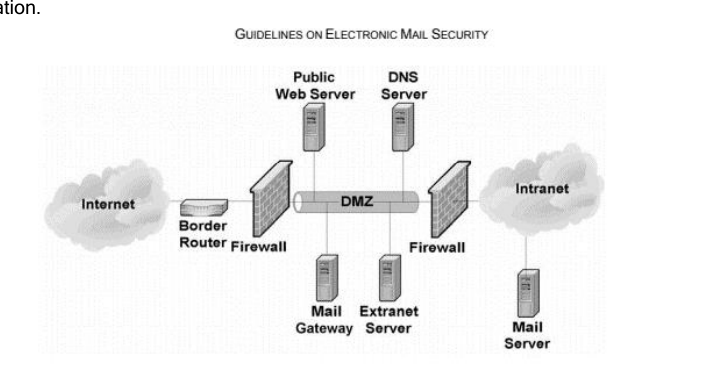
Continually under attack by malicious actors, email system security is an essential area of focus. In the pages that follow, we will discuss various best practice email configuration recommendations briefly following each checklist item, however there is one topic that we would like to dedicate extra attention to explaining. That topic is the deployment of what is often referred to as a “DMZ WAN Proxy Server” or “DMZ Reverse-WAN Proxy Server” for those organizations that maintain their own email servers.
When maintaining an internal email server, optimal security practices call for implementation of what is known as a mail gateway. The following image is an excerpt from NIST (National Institute for Standards and Technology) Special Publication 800-45, Version 2, depicting a type of mail gateway configuration.
In early 2021, Microsoft announced the discovery of several exploits that provided the ability for malicious actors to compromise Microsoft Exchange servers. Upon learning of the exploits, our organization deployed the associated patches immediately to active clients employing the use of Microsoft Exchange, however our efforts did not stop there. Because the exploits were believed to have been in existence for many weeks before Microsoft announced them, it was also necessary to conduct thorough scans of each and every active Exchange client’s environment to search for signs of “backdoor” access having been maliciously installed prior to Microsoft’s release of the associated fix. While our findings seemed to confirm the contention that as many as 25-30% of Microsoft Exchange Servers had been subjected to some form of malware insertion in preparation for a breach, NONE of those clients with a DMZ WAN Proxy Server installed yielded any evidence of successful tampering.
Although we often recommend that clients migrate to Microsoft’s Cloud-based Microsoft 365 for email hosting, for those clients whose security and/or workflow necessities make the continued use of internal Exchange servers the preferred solution, we strongly encourage the implementation of a DMZ WAN proxy server. The cost of adding such a server can be minimal, especially for those organizations already leveraging virtualization.
As always, no two environments or organization’s needs are identical. Should you wish to discuss the implementation of a DMZ WAN proxy server, or any of the other recommendations that follow, your Sandbox Technologies Engineer, Account Manager, or Consulting CIO will be happy to answer any questions you may have.
- – 2 –
Original PDF · page 3
Table of Contents
Recommended Practices …………………………………………………………………………………………………………… 4
- – 3 –
Original PDF · page 4
Recommended Practices
Spam/Malware Pre-Filtering
Is a solution in place to filter email for spam and malware before delivery to the organization’s email server or cloud email host?
The primary purpose of Spam filtering is to reduce mailbox clutter; however, a secondary function is the mitigation of social engineering attempts – Methods deigned to deceive users into revealing login credentials and other sensitive data. Malware filtering adds another layer of security to an organization’s network by scanning emails for malware, and quarantining viruses before they reach the user’s email client software.
Keyword Scanning to Identify Restricted Content and Limit Legal Exposure
Is a solution in place to scan inbound and outbound email messages for prohibited content?
Using email for the transmission of highly sensitive data is not secure, and organizational policies often prohibit such practice. Unfortunately, human nature and the need for convenience and speed often prevail in the absence of a suitable enforcement mechanism. Keyword content scanning examines emails for ostensibly sensitive data, such as Social Security Numbers, Credit Cards, and account numbers. Keyword content scanning can be configured to obfuscate sensitive data, or to reject messages entirely, prompting the user to send it securely, or without the sensitive information.
Certificate Security
If email is hosted internally via an Exchange or other on-premises email server, has an SSL certificate been installed?
An SSL (Secure Sockets Layer) certificate is a two-part key pair used to encrypt communication, including traffic to and from Web-facing servers. TLS (Transport Layer Security) is the next generation of SSL, and differs from SSL by the protocol used to establish a secure connection. SSL and TLS utilize the same certificates however the protocols are different, and availability is dependent on the environment. A minimum of TLS 1.1 should be enabled on web-facing servers.
- – 4 –
Original PDF · page 5
DMZ WAN Proxy
If email is hosted internally via an Exchange or other on-premises email server, has a DMZ Reverse-WAN Proxy Server been deployed to add a layer of protection against direct inbound exploits?
A DMZ is a buffer network between internal network resources storing confidential data, and the public Internet. Network resources, such as servers, which need to be accessible from the Internet, are placed in the DMZ zone, and communication to and from the DMZ and LAN resources is tightly controlled and restricted. It is recommended that a reverse WAN proxy be implemented in a DMZ for all Exchange and email servers, and that all traffic originating from outside the network be directed only to the proxy.
SPF Implementation
If email is hosted internally via an Exchange or other on-premises email server, has SPF (Sender Policy Framework) been implemented?
SPF is a public list maintained as a DNS entry that lists servers authenticated as senders for a particular domain. SPF mitigates the ability of spammers to “spoof” legitimate email addresses and domains.
DKIM Implementation
If email is hosted internally via an Exchange or other on-premises email server, has DKIM (Domain Key Identified Mail) been implemented?
DKIM is a technology used to authenticate particular emails with a public/private key pair. This, in essence, certifies that an email originated from an authorized server.
- – 5 –
Original PDF · page 6
DMARC Implementation
If email is hosted internally via an Exchange or other on-premises email server, has DMARC (Domain-based Message Authentication, Reporting and Conformance) been implemented?
DMARC provides a mechanism for how email from another domain that fails SPF or DKIM mechanisms is to be handled. DMARC can be configured to reject or quarantine messages that fail SPF or DKIM checks, and then it can be configured to deliver reports of messages that have failed the above authentication checks.
Mobile Device Restrictions
Are new mobile devices restricted from connecting to the organization’s email server without prior administrator authorization?
By default, ActiveSync (the mechanism used by Microsoft Exchange Servers for communication with mobile devices) permits anyone with a valid username and password to connect a mobile device to the associated mail host. Hackers often exploit this vulnerability to circumvent multi-factor authentication protections, because said protections do not apply to mobile devices.
In BOTH internally hosted Microsoft Exchange environments, and Microsoft 365 environments, it is a recommended practice to enable a feature known as “ActiveSync Quarantine”, which requires an authorized administrator to electronically approve new mobile devices before they are permitted to connect.
Disabling POP and IMAP Services
Are POP and IMAP services disabled?
By default, Microsoft Exchange and Microsoft 365 environments allow sending and receiving email via protocols known as POP and IMAP. Both protocols are older, and rarely used. As such, it is recommended that they be disabled, as malicious actors often take advantage of the presence of these protocols to circumvent the protections of multifactor authentication.
- – 6 –
Original PDF · page 7
This document is protected by US and International copyright laws. Reproduction or distribution of this document for commercial advantage and without written permission
from Sandbox Technologies, Inc. is strictly prohibited. Any distribution must retain
attributions and this notice.
- – 7 –