
Best Practice Checklists
An exclusive publication of

Essentials every leader should understand about IT
Issue 15 – Information Security Awareness Education and Testing
Security Awareness & Phishing Testing
The one layer no firewall can patch: your people
Most serious breaches now begin with a person rather than a server: an employee clicks a convincing message, approves an unexpected login prompt, or acts on a request that looks routine. Technical controls reduce this exposure, but they cannot remove it. The human layer is the most-attacked part of any organization, and often the least maintained. The situations below happen more often than most organizations expect, and each traces back to how, and how often, staff are trained and tested.
When it goes wrong
People are less a weak link than an untended one. Most staff want to do the right thing; they simply have not been shown, recently, what today’s attacks actually look like. The point below is not to assign blame. It is to show what tends to go wrong when awareness training is treated as a one-time event rather than an ongoing practice.
One click, one password
A well-crafted email, now often written or refined with AI, imitates a trusted service and asks an employee to sign in. The employee enters their Microsoft 365 credentials on a convincing lookalike page. Minutes later an attacker is reading mail, creating hidden forwarding rules, and moving toward more valuable accounts.
If that password is reused elsewhere, one login becomes many.The wire that did not come back
Someone in finance receives an email, or increasingly a phone call using a cloned voice, from a senior leader or a familiar vendor asking to approve a payment or update banking details. The request looks and sounds legitimate, and it is urgent, so the transfer is approved.
Business email compromise is among the costliest categories of cybercrime by reported loss.Training that checked a box
The organization runs one training video a year. Everyone clicks through it, and no one is tested afterward. Nothing is measured, so no one knows who is actually at risk. By the time a real phishing message lands, the lesson has long since worn off.
A once-a-year lesson rarely survives contact with a real attack.The repeat clicker no one remediated
Simulated phishing goes out, and the same few people fail it every time. The results are filed away, but no one follows up with coaching or additional testing. A known, named risk simply stays on the network.
A risk you can measure but never address is still a risk.The common thread
None of these is really a story about a careless employee. In each case the gap was structural: training that was infrequent, generic, or never tested, and results that were collected but never acted upon. The human layer can be strengthened, but only when it is measured and maintained like any other control.
Unlike most attack surfaces, this one tends to improve with attention. People can be trained, tested, and measurably strengthened over time, provided the effort is recurring, relevant to the tactics in use today, and paired with honest testing rather than a single annual video.
What to Ask Your IT Manager or Provider
and how to know if the answers are good ones
You do not need to run a training program to oversee one. You need to know what to ask. A short glossary of today’s tactics is provided at the end, for those who want the detail. First, the part that matters: run the checklist below with your IT professional or security provider. If any item is not marked green, it may warrant a closer look.
Formal, Recurring Program
Simulated Phishing, and Beyond Email
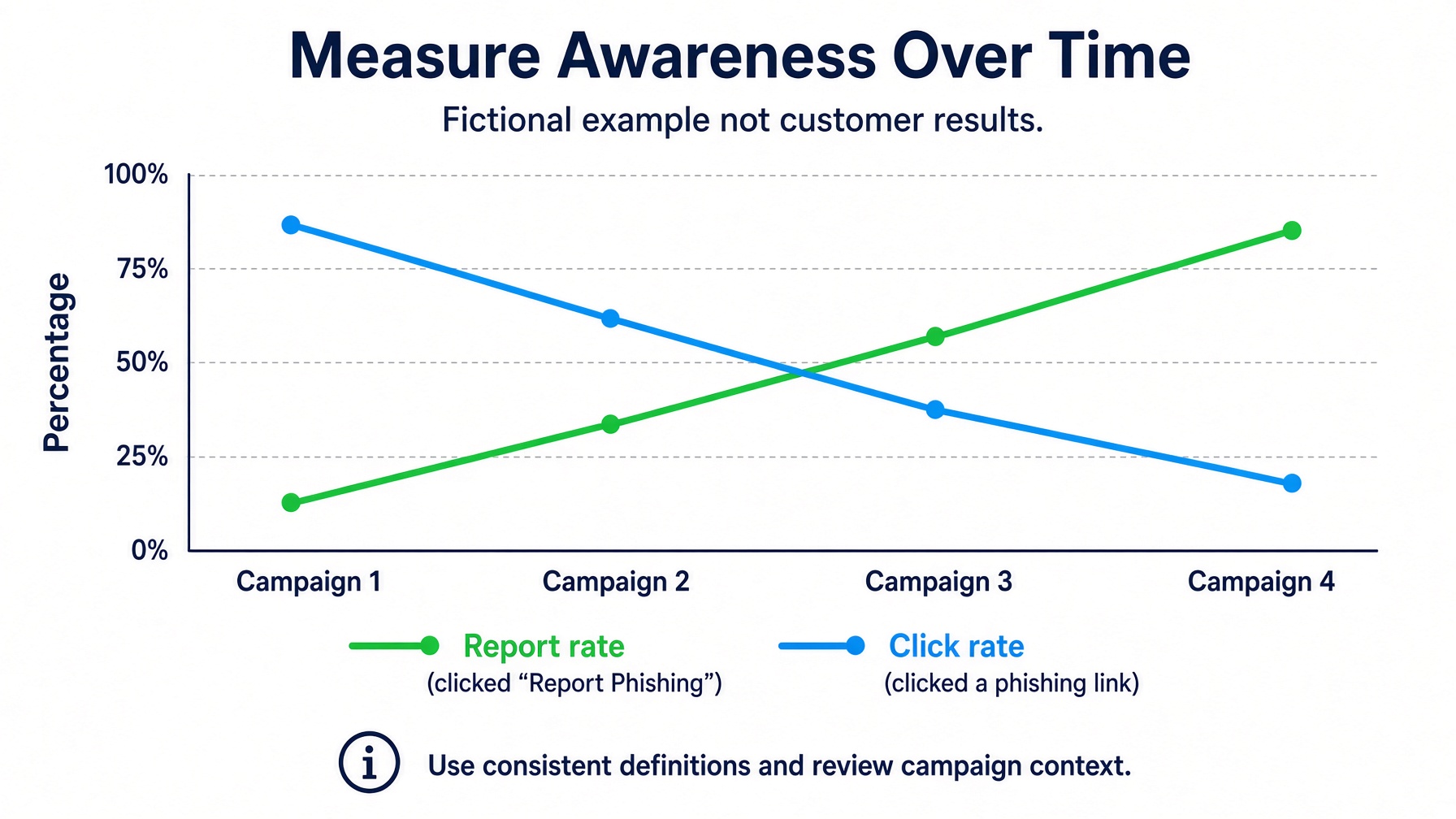
Measuring and Acting on Results
Current Tactics, Including AI-Assisted Attacks
Business Email Compromise and Payment Fraud
Credentials, MFA, and Prompt Fatigue
A Reporting Culture Without Blame
Verify Before You Trust
Devices, Remote Work, and Networks
Removable Media and On-Site Social Engineering
Data Handling and Device Discipline
Onboarding and Role-Based Coverage
The tactics worth namingA short glossary of how these attacks actually arrive. Optional.+
Phishing
Fraudulent messages, usually email, designed to trick a user into clicking, signing in, or replying. Modern versions are frequently written or polished with AI and carry few of the old spelling and grammar giveaways.
Spear Phishing
A phishing message tailored to a specific person, using details gathered about them, their role, or the company to make it more believable.
Business Email Compromise (BEC)
A targeted scam in which an attacker impersonates an executive, employee, or vendor to authorize a fraudulent payment or the release of sensitive data. It remains among the costliest categories of cybercrime by reported loss.
Vishing (Voice Phishing)
Phishing conducted by phone. Attackers now use AI-cloned voices to imitate a known colleague or leader convincingly.
Smishing (SMS Phishing)
Phishing delivered by text message, often posing as a delivery notice, bank alert, or password reset.
QR-Code Phishing
A malicious QR code that leads to a fraudulent site. It is often used to move the victim off a monitored company computer and onto a personal phone.
Pretexting
An invented but plausible story, for example “I am from IT and need to verify your login,” used to lower a target’s guard before the real request.
MFA Fatigue (Push Bombing)
An attacker repeatedly triggers multifactor approval prompts for a user, often after obtaining that user’s password, hoping that fatigue or distraction causes one request to be approved.
Baiting
Leaving infected USB drives or other media where a curious person is likely to find and use them.
Going deeper: habits worth teachingThe finer points that separate awareness on paper from awareness in practice. Optional.+
Passwords in Practice
Use long, unique passwords or multiword passphrases. Avoid short, common, or predictable passwords, predictable substitutions (such as “@” for “a”), researched personal details (a pet, a team, a birth year), and incremental changes that only add a number at renewal. Work passwords should not be shared, emailed, or saved in a browser.
“Secret” Questions
Literal answers to security questions (a mother’s maiden name, a first school) are often discoverable online. A stored, unrelated answer kept in a password manager is far safer.
Removable Media and Physical Access
Access cards should be guarded; some proximity cards can be copied quickly with inexpensive equipment. Cameras and microphones on a compromised device can be activated without the user’s knowledge, so covering or disabling them when not in use is a reasonable precaution.
Personal and Sensitive Information
Personally identifiable information should be kept out of ad hoc places such as spreadsheets and mail contact lists, and stored only where the organization has approved.
Social Media and Email Hygiene
Limiting the personal detail attackers can harvest, and avoiding the use of work email addresses for unrelated online accounts, both reduce the raw material available for a targeted attack.
Contact Sandbox Technologies for a free, no-obligation consultation.
Headquartered in Los Angeles. Serving clients nationwide and internationally since 1997.
Nationwide (Toll-Free)
877-930-8324
Los Angeles
424-207-5130
Support Helpdesk
424-207-5140