
Best Practice Checklists
An exclusive publication of

Essentials every leader should understand about IT
Issue 19 – Website Security and Oversight

Website Security & Oversight
Your website can be turned against your own visitors, quietly, and you may be the last to know
A website is often the one public system an organization runs that a stranger can rewrite. It greets every customer, yet it is frequently the least watched part of the technology estate. Sandbox Technologies does not build or host websites. As IT generalists, our role here is to help you ask the right questions of the professionals who do, so that a system carrying your brand does not quietly become a liability.
When it goes wrong
Most website incidents are not dramatic. They tend to be quiet, they persist for weeks, and they usually trace back to a basic control that lapsed rather than to a sophisticated attack. The point is not to alarm. It is to make the exposure visible so it can be managed on purpose, whether the site is run in house or by a third party.
A Site That Attacks Its Own Visitors
An unnoticed compromise injects hidden code into an otherwise ordinary company site. Visitors are quietly redirected, served malware, or shown a convincing fake login. Search engines and browsers eventually flag the domain as dangerous.
Customers meet a red warning screen instead of your business.An Unpatched Plugin
A content platform, theme, or plugin goes months without updates. A publicly known vulnerability is found by automated scanning and exploited, giving an attacker a foothold to alter pages or harvest whatever the site can reach.
A known, patchable hole is left open long enough to be found.A Certificate That Lapsed
A TLS certificate expires, or the site still allows an outdated protocol version. Every visitor is met with a full-page browser security warning, and some conclude the business itself is fraudulent or defunct.
A renewal nobody owned turns customers away at the door.Mail Sent In Your Name
A domain that never published sender authentication is an easy target. Others forge messages that appear to come from the organization, and recipients, customers included, receive convincing phishing “from” a trusted name.
Your domain becomes the return address on someone else’s fraud.A Skimmed Form
A single third-party script, loaded for analytics or a checkout field, is tampered with upstream. It silently copies what visitors type into a form or payment box and sends it elsewhere, while the page looks and behaves exactly as intended.
Data is stolen in the browser, before the site ever records it.The common thread
None of these required a brilliant attacker. Each traces back to an unglamorous basic that lapsed: a platform left unpatched, a certificate left to expire, a host never vetted, or mail left unauthenticated. The exposure is ordinary, and so is the remedy.
You may not build or host the site yourself, but the exposure is yours. Nearly every outcome above is prevented by a handful of routine controls, not by a larger budget. Overseeing them starts with knowing what to ask.
What to Ask Your Web Team or IT Provider
and how to know if the answers are good ones
You do not need to build or host a website to oversee one. You need to know what to ask. Sandbox Technologies does not offer website development or hosting, but as IT generalists we can help you weigh the answers and, where useful, identify well-vetted Web professionals. A short primer on the terminology is provided at the end. First, run the checklist below with your Web developer or IT professional. If any item is not marked green, it may warrant a closer look.
Formal Security Standards
Valid TLS Certificates and Current Protocols
Web Host Vetting
Code Integrity and Routine Updates
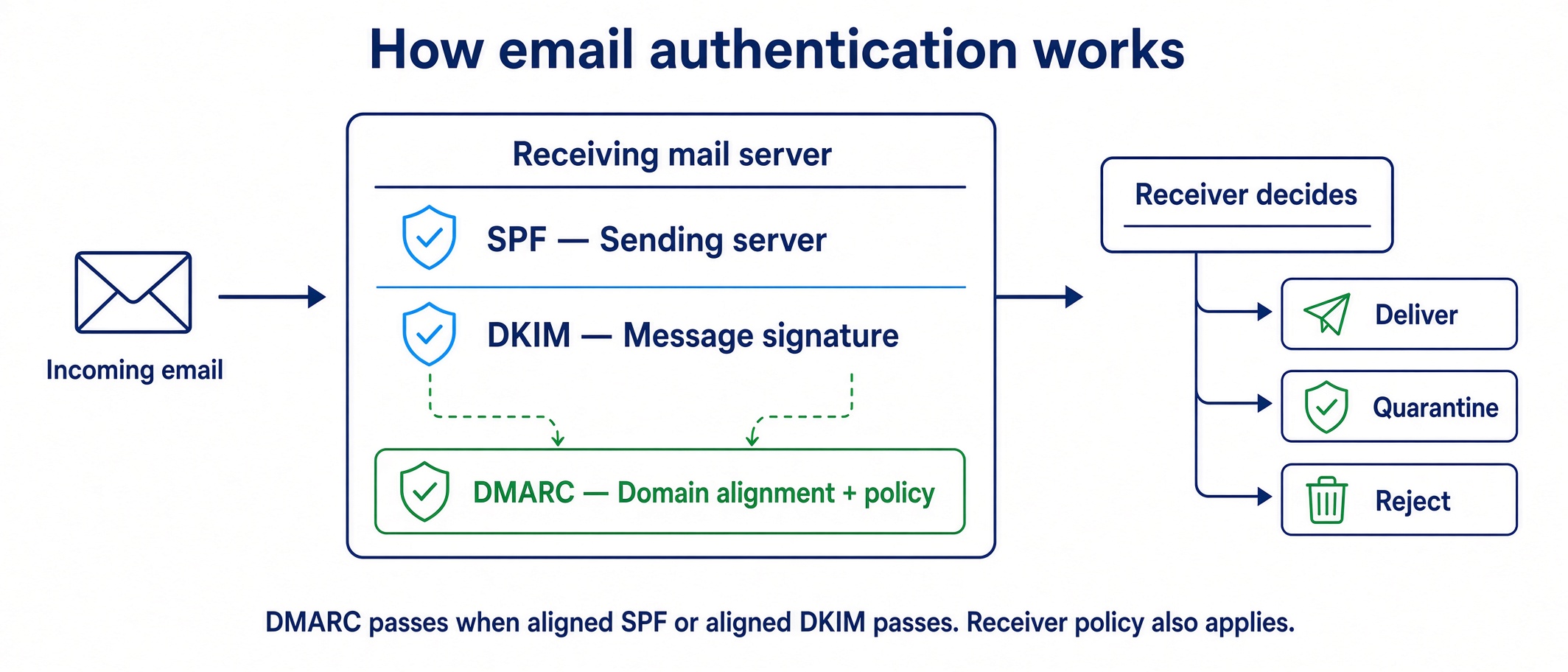
Authenticated Mail: SPF, DKIM, and DMARC
The primer: certificates and authenticated mail, in plain termsTerminology, for whoever wants the detail. Optional.+
TLS and SSL Certificates
SSL (Secure Sockets Layer) was the original protocol for encrypting web traffic. TLS (Transport Layer Security) is its successor and is what actually secures connections today, though the certificates are still widely called SSL certificates. The certificate helps authenticate the server and binds its identity to a public key. TLS establishes the keys used to protect the connection; security depends on supported protocol versions, cryptographic choices, implementation, and configuration. TLS 1.0 and 1.1 are deprecated, TLS 1.2 is the practical minimum, and TLS 1.3 is preferred.
SPF (Sender Policy Framework)
A public list, published as a DNS record, of the servers authorized to send mail for a domain. It makes it harder for others to spoof legitimate addresses at that domain.
DKIM (DomainKeys Identified Mail)
A method of signing messages on behalf of a domain. The receiving server verifies the signature using that domain’s public key and checks the message parts covered by the signature. This does not by itself prove the identity of an individual sender or the legitimacy of the request.
DMARC (Domain-based Message Authentication, Reporting and Conformance)
A policy that connects SPF and DKIM authentication to the domain in the visible From address. A message passes DMARC when at least one authentication method passes with an aligned domain. The domain owner can request quarantine or rejection of messages that fail DMARC and receive reports; receiving systems may apply their own policies.
Contact Sandbox Technologies for a free, no-obligation consultation.
Headquartered in Los Angeles. Serving clients nationwide and internationally since 1997.
Nationwide (Toll-Free)
877-930-8324
Los Angeles
424-207-5130
Support Helpdesk
424-207-5140